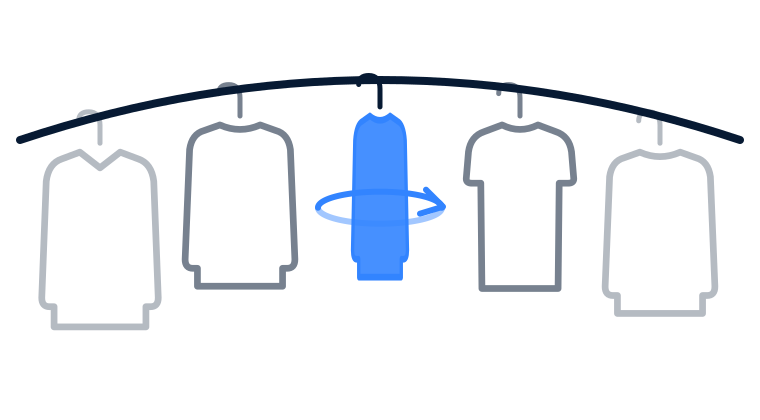
Tees hang side-on along a rail, the one you point at turns to face you, and the whole row swings when the rail moves, with each hook leading and each hem trailing. It is one of the better product interactions going round social right now. Try it below, then copy the prompt and let your coding agent build it into your own shop.
Try it first: pull one off the rail
Point at a tee. Then drag the rail, scroll it, use the arrows or rest the cursor near either end. Start it hard, stop it hard, and watch the hems.
Autumn drop Heavyweight tees
Pull one off the rail.
Build it with Claude Code, Codex or Cursor
The prompt below carries everything the demo does: the structure, the tuned spring numbers and the bugs I hit, so your agent does not have to rediscover them. It works in React, Vue, Svelte, Shopify Liquid or plain HTML.
- Claude Code
claude - Codex
codex - CursorAgent chat
- Open your shop's project in the agent.
- Paste the prompt, and fill in the two
[CHOOSE: …]lines: what photos you have, and what a tap does. - Approve the file list it proposes, then review the diff like any pull request.
Build a "clothes-rack" product rail for the product grid in this codebase.

WHAT IT SHOULD FEEL LIKE
- Products hang from hooks along a straight horizontal rail. At rest each
  product hangs SIDE-ON, showing its side photo (rest angle ~84-93deg,
  varied per product so the row looks real). Price tags hang from the
  hooks and always face the viewer.
- Hover (or keyboard focus) on a product turns it to face the viewer
  (0 degrees) near-instantly: ~0.12s to 90%, settled by ~0.18s, no wobble. On
  leave it turns back to its resting angle.
- The rail scrolls sideways to show more products: wheel, trackpad,
  touch, keyboard, prev/next buttons, mouse drag with a fling, and
  resting the cursor near either end (the rail runs that way).
- The rail is a shallow arch, ends ~18px lower than the middle, and
  every hook rides it as the row scrolls.
- When the rail moves, every product swings like a pendulum from the top
  of its hook: the hook moves first and the hem lags behind; while the
  rail keeps moving the hem trails at a slight lean; when the rail stops
  the hem swings through past vertical and settles in ~3-4s.

BEFORE YOU WRITE CODE
1. Find the product grid / product card component and how product images
   are loaded. List the files you will change and wait for my OK.
2. Check the product images. Ideal: front, side and back shots, cut out
   on transparent backgrounds, on the same canvas size, with the neck on
   the same pixel in all three.
   [CHOOSE: front + side + back shots exist | front shots only (use the
   FRONT-ONLY FALLBACK below) | one white sample per style, tinted per
   colourway (use TINTING below)]
3. Do not change routing, analytics events, add-to-cart handlers, or any
   class name, id or data-* attribute that other code reads.

STRUCTURE (adapt to the framework in use)
- A scroll container (overflow-x: auto, no scroll-snap) holding a single
  row of product cards. The rail itself is a separate, non-scrolling bar
  behind the row, positioned where the hooks bend over it.
- Each card stays a link to the product, with
  aria-label="<name>, <price>". Inside it:
    .hanger__swing (aria-hidden="true")     swings; pivot = top of the hook
      hook image
      .hanger__spin                         turns; axis = through the neck
        .face--front   front photo          one plane...
        .face--back    back photo           ...rotateY(180deg)
        .face--side    side photo           crossed plane: rotateY(-90deg),
                                            photo mirrored with scaleX(-1)
                                            so the shirt's front leads
        .face--far     side photo           rotateY(90deg), not mirrored
      price tag                             after the spin, so it paints on top
- CSS:
  - card: position: relative; fixed aspect-ratio.
  - .hanger__swing: position: absolute; inset: 0;
    transform-origin: 50% 2% (top of the hook); perspective: 640px;
    perspective-origin: 50% 25%. Keep it transform-style: flat.
  - .hanger__spin: position: absolute; inset: 0;
    transform-style: preserve-3d; transform-origin at the neck;
    transform: rotateY(var(--rest)), with --rest set per card.
  - faces: position: absolute, same box; backface-visibility: hidden.
    Front and back use opacity: var(--fw); both sides var(--sw).
  - side-on a product is ~40% of its card wide: overlap neighbouring
    cards by ~20% of their width each side; give the hovered / focused /
    tapped card a higher z-index. Make the card itself pointer-events:
    none and add a hit area the width of the hanging product (~40%),
    widened to the whole card while that card is turned, so overlapping
    cards don't steal hover and a sleeve doesn't drop it.
  - NEVER put filter, opacity < 1, overflow: hidden, clip-path or mask on
    .hanger__spin. They flatten the 3D context. Opacity, masks and drop
    shadows go on the faces.

MOTION (plain JavaScript, one requestAnimationFrame loop, no library)
- Each frame, dt = min(seconds since last frame, 0.1). Step both springs
  below in fixed 1/120s slices (ceil(dt * 120) substeps), so a stiff
  spring keeps real time on a 30fps phone and a 144Hz monitor alike.
- Rail motion, read FIRST each frame (before writing any styles):
    speed   = -(scroller.scrollLeft - lastLeft) / dt   // hooks' px/s, right = +
    railV   = 0.5 * railV + 0.5 * speed
    railAcc = 0.5 * railAcc + 0.5 * (railV - previous railV) / dt
- Turn, per card (angle a in rad, speed w):
    target = (hovered and not dragging) or focus-visible or pinned ? 0 : rest
    w += (-900 * (a - target) - 54 * w) * dt;   a += w * dt
    spin.style.transform = `rotateY(${a}rad)`
- Crossfade, per card, from the same angle. The fades OVERLAP so at
  least one photo is always solid (a single 1-x fade goes see-through
  at 45deg):
    c = cos(a)^2
    --fw = smoothstep(0.2, 0.5, c)
    --sw = 1 - smoothstep(0.5, 0.8, c)
- Swing, per card (angle s in rad, speed v):
    v += (-30 * k * sin(s) - 2.6 * v
          + (0.0011 * railAcc + 0.0036 * railV) * cos(s)) * dt
    s = clamp(s + v * dt, -0.45, 0.45)
    swing.style.transform = `rotate(${s}rad)`
  k is per card, 0.8-1.2 (heavier products lower), so the row never
  swings in lockstep.
  Positive rotate is clockwise and carries the hem LEFT, which is what a
  rail moving right does, so both rail terms are added, not subtracted.
- Mouse drag: on pointerdown (mouse only) remember x and scrollLeft; past
  4px of movement, capture the pointer and set scrollLeft as it moves.
  Hovered cards do not turn while dragging. On release, keep scrolling at
  the last rail speed, multiplying it by exp(-4 * dt) each frame, and
  swallow the click that ends the drag.
- Prev/next buttons: scroller.scrollBy({ left: ±60% of its width,
  behavior: "smooth" }).
- Edge run: on pointermove (not touch), zone = min(140px, 18% of the
  rail's width); depth into the left/right zone d = 0..1;
  edgeTarget = ∓720 * d² px/s (0 outside the zones; 0 on pointerleave
  and while dragging). Each frame ease towards it:
    edgeV += (edgeTarget - edgeV) * (1 - exp(-6 * dt))
  and move the rail by edgeV * dt, clamped to its ends. Keep the rail's
  position in a float and write it to scrollLeft (resync the float when
  scrollLeft moves by more than 1px for any other reason). While
  |edgeV| > 40, hovered cards do not turn.
- Arch: draw the rail as an SVG quadratic across the visible rail,
  "M0 (y+sag) Q500 (y-sag) 1000 (y+sag)" with preserveAspectRatio="none"
  and sag = 18. Measure each card's centre (offsetLeft + width/2) once
  and on resize; each frame lower each card by
  sag * u², u = clamp((centre - scrollLeft) / railWidth * 2 - 1, -1.4, 1.4).
  Without JS or with reduced motion keep a straight rail and no offsets.
- Start the loop on scroll, hover, focus, tap or drag; stop it when the
  rail is still and every card has settled (|a - target|, |w|, |s|, |v|
  all tiny), snapping a to target and s, v, w to 0.

TINTING (if one white sample serves every colourway)
- Each face: isolation: isolate; inside it a .face__tint layer
  (background: var(--cloth); mask: url(photo) center / contain no-repeat)
  and the white photo on top with mix-blend-mode: multiply.
- Prepare the photo: cut out, white at true white, folds' contrast
  stretched a little so they survive the multiply. Solid colours only;
  textured or printed colourways need their own photos.

FRONT-ONLY FALLBACK (if there is no side shot)
- Rest at 55-65deg instead of ~90deg (a flat photo vanishes edge-on) and
  drop the side faces. Add 10 slices behind the front photo, spread
  across translateZ -11px to 11px, each a darker solid colour masked by
  the front photo, and a black overlay with opacity
  0.35 * (1 - |cos(a)|) for shade.

FALLBACKS AND ACCESSIBILITY
- No JS: a CSS-only turn, scoped under a class (e.g. .rack--css) that the
  script removes when it takes over. Register --fw and --sw with
  @property (<number>, initial 0 and 1) so they transition:
    .hanger__spin { transition: transform 180ms cubic-bezier(.16,1,.3,1),
                    --sw 80ms, --fw 80ms 60ms; }
    .hanger:hover .hanger__spin, .hanger:focus-visible .hanger__spin
      { transform: rotateY(0deg); --fw: 1; --sw: 0;
        transition: transform 180ms cubic-bezier(.16,1,.3,1),
                    --fw 80ms, --sw 80ms 60ms; }
- prefers-reduced-motion: no springs and no swing; the turn is instant.
- Touch: native scroll drives the swing. [CHOOSE: a tap turns the product
  and a second tap opens it | a tap simply opens the product]
- Keyboard: a visible :focus-visible ring; focus turns the card to face
  front; never block Enter from opening the product.
- Animate only transform, opacity and the custom properties. No layout
  reads in the loop other than scrollLeft, read before any writes.

DONE WHEN
- At rest the products hang side-on at slightly different angles, showing
  their side photos; hovering one turns it to face front crisply, settled
  within ~0.2s, no wobble, and never see-through mid-turn.
- Flinging the rail, or resting the cursor near an end, makes the hems
  lag behind the hooks, then swing through when it stops, then settle;
  tags never turn; the hooks follow the arched rail.
- With JS disabled you get the CSS turn and a scrollable rail; with
  reduced motion, an instant turn and no swing.
- No console errors; analytics and add-to-cart behave exactly as before;
  Largest Contentful Paint is no worse.
- Finish with a summary of the files you changed and the dials to tune:
  turn stiffness/damping (900, 54), swing pull/damping (30, 2.6), and how
  hard the rail pushes the hem (0.0011 acceleration, 0.0036 speed).
Agents get four things wrong here, which is why the prompt spells them out. They put opacity or a filter on the 3D wrapper, which flattens it. They crossfade with a single 1 - x, so the shirt goes see-through halfway. They forget to mirror the side photo, so the shirt turns towards you back-first. And they flip the sign of the swing, so the hem leads the hook.
How it works
- Two photos, crossed. The front photo sits on one plane and the side photo on a second plane crossing it at the neck's vertical axis. At rest the tee shows its side square-on; turned, its front. Two overlapping fades swap them, so the shirt is never see-through.
- A stiff spring for the turn.
K = 900,C = 54: 90% round in 0.12 s, settled by 0.18 s, no wobble. Unlike a CSS transition, it keeps its speed when you change your mind halfway. - A pendulum for the swing. Each tee hangs from its hook and is driven by the rail's speed and acceleration, read from
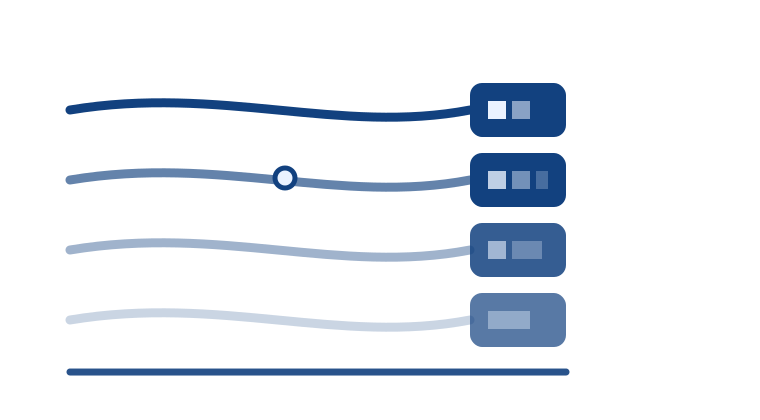
scrollLeftevery frame. Each tee swings at a slightly different rate, so the row never moves in lockstep. - A rail that runs and bends. Resting near either end runs the rail at up to 720 px/s, eased in. The rail is a shallow arch, and every hook is lowered by
18 · u²to ride it. - Nine colourways, one photo shoot. Each face is a solid colour masked to the shirt's shape, with the white photo multiplied over it, so the folds carry over. The three photos weigh 8–12 KB each.
The whole demo is two files you can read: rack-demo.js and rack-demo.css.
Before you ship
- Photos: front, side and back, cut out, on one canvas size with the neck on the same pixel. Only a front shot? Rest at 55–65° instead of 90°, and fake the depth with darker silhouette layers. The prompt covers both.
- Everyone can use it: taps and keyboard focus turn tees too, reduced motion gets an instant turn and no swing, and without JavaScript there is a CSS turn and a scrollable rail.
- Measure it: A/B test the rail against your grid on product-card click-through and add-to-cart, and keep an eye on Largest Contentful Paint. If it does not move a metric, it is decoration. I made the same case in AI features don’t matter if they don’t move a metric.